Coupling table
Tap  to view the coupling table. Shows the full result for one coupling at a time.
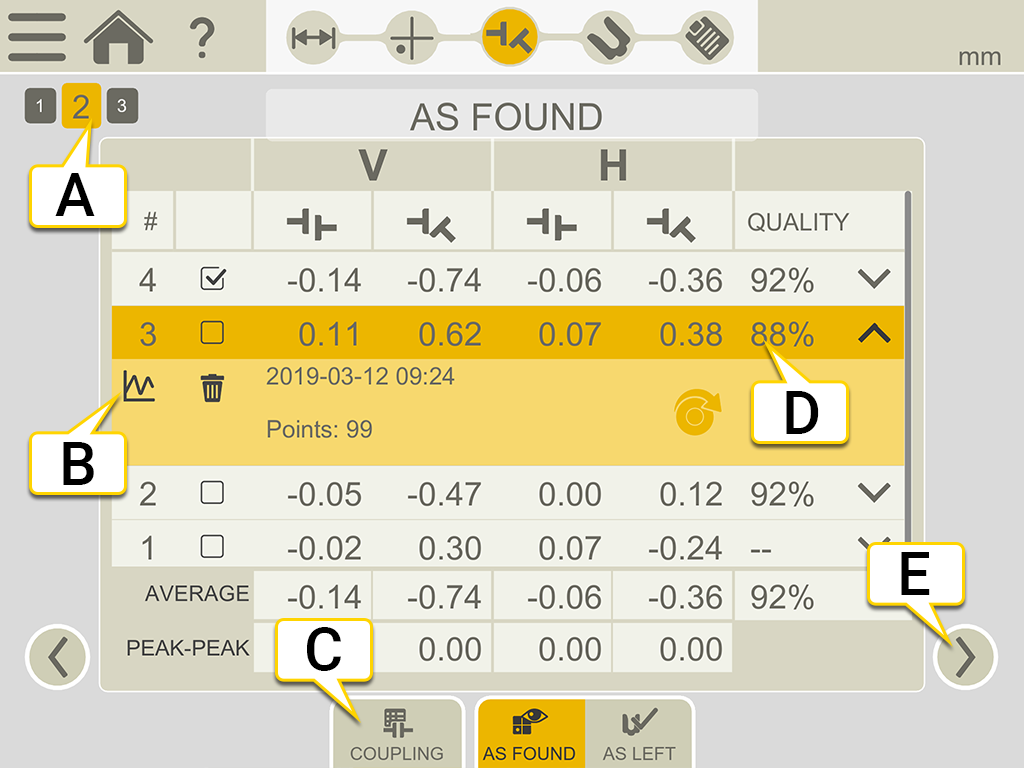
- Current coupling. Full result is shown for this coupling.
- Tap
 to open the Detailed view. Go to Result details.
 - Tap to change result view.
- Quality assessment for the measurement. Available if you have used the method Continuous Sweep or Multipoint.
- Tap to show another coupling.
If you want delete a measurement, tap  and
and  .
.
| ! | Uncertain coupling. When you adjust one coupling, it might affect the next coupling in the machine train. This coupling needs to be remeasured. |
| * | The coupling has been adjusted. This is not a value from your original measuring. |
Use
By default, all measurements are included in the calculations. If you deselect measurements, the values for Average and Peak to Peak are updated. The excluded measurements are not included in the calculations, but still visible. The report will not be affected if you hide any measurements, in the report it is always the latest measurements that are shown.
NOTE! It is always the latest measurement and adjustment that are shown in the report.
Average
The average offset and angle values. Calculations are based on the measurements marked as "Use".
Peak to peak
The total variation in offsets and angles. Calculations are based on the measurements marked as "Use".