Using the XT20/XT22
XT20 and XT22 can be wirelessly connected to your Easy-Laser® XT alignment app for the programs Straightness and Values. To see example of Set up and Measuring procedure, Go to Measure
NOTE! If you want to use the vertical electronic level in XT22 when orienting the laser plane vertically, the laser transmitter must be mounted with the XT22 product label facing upwards. See image below.
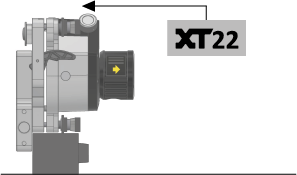
Vertical mounting of XT22.
Laser transmitter mounting
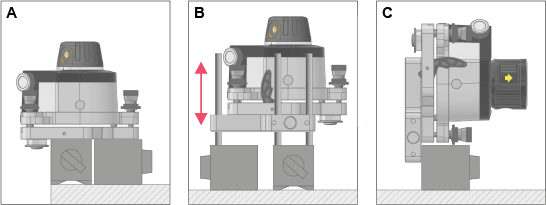
In addition to placing the laser transmitter directly on the object to be measured, it can be mounted on magnet bases. The Multi bracket 12-1275 provides even more versatile mounting possibilities, see examples below.
-
Mount one or two magnet bases directly on the tilt table. Release lever must first be removed.
-
Use Multi bracket and rods on magnet bases to position the laser transmitter at required height.
-
Use the Multi bracket to mount the laser transmitter vertically on a magnet base.
XT20/XT22 Display views
-
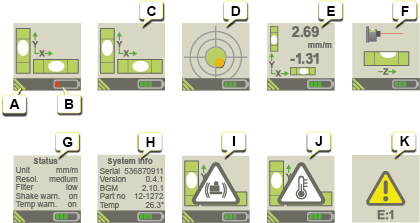
Wireless XT connection.
-
Battery status. If necessary, charge the XT20/XT22.
-
Measuring view: Electronic levels.
-
Measuring view: “Cross view”.
-
Precision measuring view: High accuracy measurement values (for example presented in millimeters per meter).
-
Vertical measuring view.
-
View of settings made in the app.
-
System information.
-
Shake warning, see below.
-
Temperature warning, see below.
-
No access to device, error code E1. The unit must be sent for repair.
Warnings during measurement
The following Warnings may appear in the XT20/XT22 display:
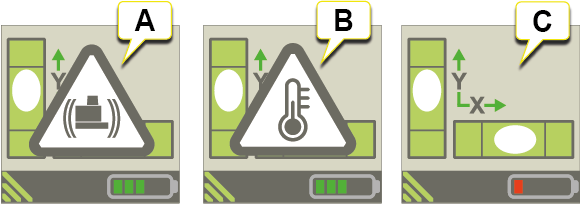
- Shake warning for laser transmitter. If vibrations are strong enough to make the shake warning appear during measurement, increase the filter level of electronic levels from the XT app (via the Context menu).
- Temperature warning for laser transmitter.
-
Low battery warning. Charge the laser transmitter.
NOTE! When shake warning or temperature warning appears, it can be cleared by pressing any button on the laser transmitter. However, it is recommended to clear the warning from the XT app during measurement to avoid movements of the laser transmitter.
NOTE! You can deactivate shake warning and temperature warning completely by selecting "OFF" in the XT app.